

Table of Contents
Microsoft Windows has shaped the landscape of personal and professional computing since the 1980s. With the release of Windows 11, Microsoft has brought significant changes to its flagship operating system. In this article, we explore the evolution of Windows, delve into the features of Windows 11, and assess its impact on users and the broader tech industry.
The Rise of Microsoft Windows
The story of Microsoft Windows begins in the mid-1980s, a time when personal computing was rapidly gaining ground, yet most users were confronted by the intimidating, text-based interface of MS-DOS. Recognizing the need for an accessible computing experience, Microsoft launched Windows 1.0 in 1985. This pioneering software wasn’t an operating system in its own right but a graphical shell for MS-DOS, enabling user-friendly navigation through windows, icons, and menus—a radical shift from the esoteric command line. With the mouse as a new input device, Windows 1.0 introduced the revolutionary concept of a graphical user interface (GUI) to mainstream PC users.
Windows transformed what it meant to use a computer. For the first time, average users could launch programs, switch between tasks, and manipulate files through intuitive visual elements. The early releases were modest, but with the debut of Windows 3.0 in 1990, Microsoft delivered significant improvements to graphics, memory management, and multitasking. This watershed moment, coupled with support for a wide ecosystem of hardware and software, set the stage for the explosion in PC adoption throughout the 1990s. Windows rapidly established itself as the gold standard for personal computing environments.
The success of Windows was due not only to its widespread appeal among home and business users but also to Microsoft’s strategy of developing specialized families to address diverse computing needs. Windows NT and its successors targeted enterprise and mission-critical applications, while dedicated versions such as Windows Server, Embedded, and IoT extended the platform’s reach into data centers, industrial control systems, and connected devices. In the process, Windows became synonymous with personal and professional computing, setting benchmarks that shaped the entire technology landscape and forced competitors to adapt.
Windows Through the Decades
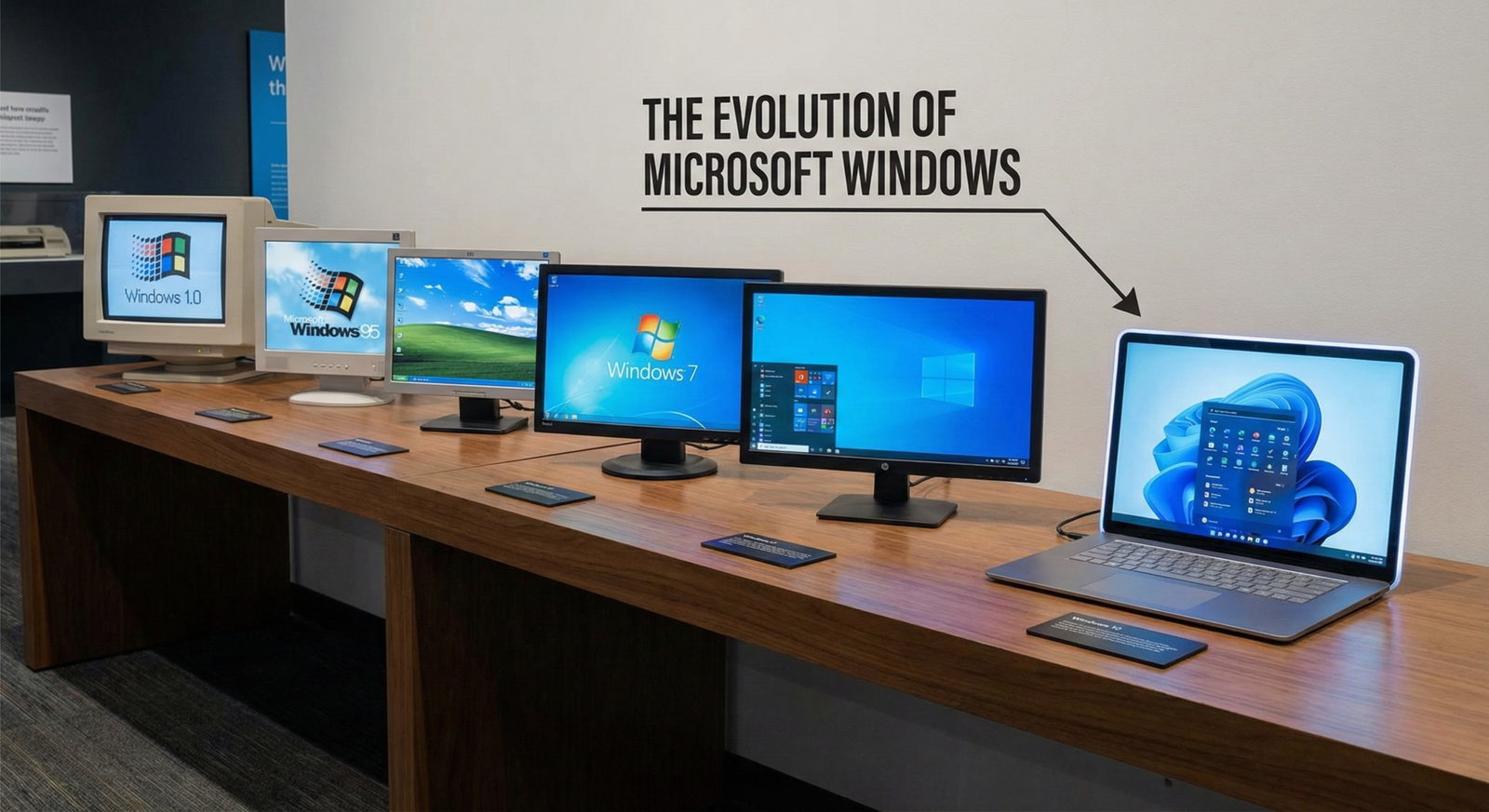
The unfolding story of Windows charts the evolution of both computing technology and user expectations across four decades. Having already secured its dominance in personal computing, Microsoft faced the challenge of responding to rapidly changing hardware and a diverse array of user scenarios. Windows 95 was a landmark moment, introducing the concept of the Start menu and taskbar, which revolutionized how users navigated their systems. Bundled with native networking and Internet capabilities, Windows 95 made the desktop experience more intuitive and connected.
The transition from the MS-DOS foundation to the more robust Windows NT architecture in the late 1990s marked a turning point. Windows 2000 and its direct consumer descendant, Windows XP, delivered significant improvements in stability, security, and compatibility. Windows XP in particular resonated with both enterprise and home users due to its reliability and long-term support, becoming one of the most beloved and widely deployed operating systems in history.
Throughout its journey, Windows expanded into different market segments. Specialized branches such as Windows Mobile brought the familiar Windows experience to handheld devices, prefiguring today’s smartphone ecosystems. Windows Embedded provided a customizable OS for ATMs, industrial machines, and kiosks, demonstrating Microsoft’s flexibility in addressing non-traditional computing environments.
With the advent of Windows Vista and its focus on security and graphical advances, the path was laid for Windows 7, which refined usability, efficiency, and aesthetics. Microsoft continued to adapt with Windows 8 and 8.1, attempting to bridge PC and tablet experiences, though not without controversy. Eventually, Windows 10 unified desktops, tablets, and even IoT devices under a single platform with ongoing updates.
This evolution reflects Microsoft’s ongoing adaptation to the demands of shifting hardware, new computing paradigms, and emerging digital lifestyles, paving the way for the innovations introduced in Windows 11 as the next leap forward.
Windows 11 A New Era for the Operating System
With the unveiling of Windows 11, Microsoft signaled a decisive shift for its flagship operating system, responding to a transformed digital world shaped by remote work, hybrid lifestyles, and heightened expectations for security and style. At first glance, the redesign is striking: the Start menu is newly centered on the taskbar, echoing trends from mobile and macOS environments. The user interface emphasizes rounded corners, subtle transparency, and a meticulous attention to spacing, yielding a cleaner, more minimal aesthetic. This new look is meant not only to modernize but to improve workflow and focus, ensuring tools and content are always within easy reach.
Central to productivity are the enhanced window management tools. Snap Layouts and Snap Groups allow users to quickly arrange and recall sets of open apps, facilitating multitasking across multiple displays and workflows. Virtual desktops are revamped for easier switching, and touch and pen support is more deeply embedded. Microsoft Teams is integrated directly into the taskbar, enabling instant communication for work and personal connections—an unmistakable nod to the realities of modern collaboration.
Beneath the surface, Windows 11 makes bold technical choices. Requiring TPM 2.0 and UEFI Secure Boot tightens system security, defending against firmware attacks and enabling hardware-anchored trust. In a break from the past, Windows 11 abandons compatibility with many older CPUs, focusing optimization on newer, more efficient Intel, AMD, and ARM architectures. This focus empowers next-generation gaming through DirectStorage for faster loading, Auto HDR, and deeper Xbox integration. Support for running Android apps via the Microsoft Store expands app versatility, blurring lines between mobile and desktop computing. Together, these decisions position Windows 11 as a platform built for the future, setting higher standards for security, performance, and a seamless experience across device types.
Impact on Users and the Tech Ecosystem
stricter hardware requirements—especially its mandate for TPM 2.0 and newer processors—sparked significant debate among users and the broader tech ecosystem. Many individuals with relatively recent PCs found themselves excluded from the official upgrade path. While Microsoft framed these requirements as measures to enhance security and performance, countless users criticized the sudden obsolescence of otherwise capable devices. This move fueled concerns over electronic waste and the financial burden on consumers forced to purchase new hardware sooner than anticipated.
For device manufacturers and the hardware industry, these requirements spurred a wave of new device sales, integrating modern security chips and firmware more deeply than ever before. However, for software developers, Windows 11 presented both challenges and opportunities. Developers had to ensure compatibility with a refreshed set of APIs and new hardware standards, but this transition also enabled the creation of more secure and performant applications. Notably, the platform’s hardware baseline streamlined support and reduced legacy technical debt, albeit at the cost of alienating a segment of the potential user base.
Within enterprises, tighter security controls in Windows 11 appealed to business IT departments seeking to future-proof infrastructure against evolving cyber threats. Yet, the hardware leap complicated fleet upgrades, sometimes resulting in prolonged dual-environment scenarios.
Competition with macOS and Linux intensified as some frustrated users explored alternative platforms. While Windows 11 retained a substantial market share, adoption rates, though rapid initially, were tempered by device compatibility issues. Features emphasizing seamless user experience and productivity, from Snap Layouts to deeper integration with Microsoft 365, kept Windows relevant in a diversifying market.
Ultimately, these shifts set the groundwork for ongoing transformation, fostering a more modern, secure Windows ecosystem, and signaling the direction for both current productivity and future innovations.
Looking Forward The Future of Windows
Looking toward the future, Windows is poised to undergo significant transformation, driven by a rapid pace of technological change and evolving user expectations. Recent trends suggest a pronounced shift toward enhanced cloud integration, where seamless synchronization and remote access will be at the core of the Windows experience. The convergence of local and cloud resources could see desktops, apps, and personal settings follow users from device to device, blurring the line between traditional and remote computing.
Artificial intelligence is another axis of growth for Windows. Early integration of AI-powered tools such as Copilot hints at a future where the operating system anticipates user needs, automates routine tasks, and delivers tailored recommendations. More advanced AI could bolster security measures, streamline workflows, and intelligently manage system resources, allowing for smarter multi-tasking and greater efficiency. There’s potential for these capabilities to extend into development environments, accessibility features, and even creative workflows, transforming how users engage with their computers.
Cross-device compatibility is gaining prominence as users rely on a diverse ecosystem that spans PCs, tablets, phones, and IoT devices. Continued investment in adaptive interfaces and shared experiences could make transitions between devices practically invisible, fostering greater productivity and user satisfaction.
With technology cycles accelerating, adaptability remains crucial. Windows will need to support an ever-broader spectrum of device types, input methods, and deployment models to stay relevant. Windows 11’s refined architecture and modular approach lay foundational elements, enabling quicker updates, experimental features, and better support for emerging hardware. By strengthening cloud, AI, and interoperability, Windows not only addresses modern demands but also fortifies its platform for innovations yet to emerge, setting the pace for future personal and professional computing.
Conclusions
In summary, Microsoft Windows continues to lead the personal computing world, constantly adapting to technological advancements and user needs. Windows 11 represents a milestone in design, security, and integration with other modern technologies. The future of Windows appears promising, with ongoing innovation ensuring its relevance and dominance in the global operating system market.
Welcome! For more in‑depth product and tech reviews, visit homepaw shub .
 Email Submit Button: “Get Free Guide Now”
[…] workflows and potential software bugs are not yet well-documented—unlike mature platforms such as Windows or Apple HomeKit, glitches may emerge during […]